
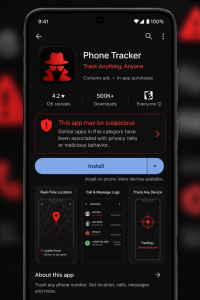
You downloaded it from the official Google Play Store. It looked legitimate. It even claimed to be affiliated with a government agency. You paid a small fee to see the results — and what you got back was completely made up.
This is exactly what happened to more than 7.3 million Android users in a newly uncovered fraud campaign researchers are calling "CallPhantom."
What's Happening
Cybersecurity researchers at ESET discovered 28 fraudulent apps on Google's official Play Store, all claiming to give users access to call histories, SMS records, and WhatsApp call logs for any phone number. The apps had a simple, professional-looking interface, requested no suspicious permissions, and appeared completely legitimate on the surface.
Once a user paid — subscription plans ranged from $6 to $80 — they were shown data that was entirely fabricated. The phone numbers and names displayed were randomly generated and hardcoded directly into the app. There was never any real data. Not once.
How the Scam Worked
Step 1 — The Setup: Apps were published on the official Google Play Store with convincing names and descriptions. At least one listed its developer as "Indian gov.in" to appear government-affiliated and trustworthy.
Step 2 — The Promise: Users were told they could look up call histories, SMS logs, and WhatsApp activity for any phone number — a capability that does not legitimately exist for consumers.
Step 3 — The Paywall: To "unlock" the results, users were required to pay via Google Play subscriptions, third-party payment apps, or direct card entry inside the app.
Step 4 — The Fake Results: After payment, users received randomly generated, fictional data. No real information was ever retrieved or delivered.
Step 5 — The Trap: If a user tried to exit without paying, some apps sent a fake notification claiming their results had been emailed to them — then redirected them straight to the payment screen when tapped.
Why This Is So Dangerous
What makes CallPhantom particularly concerning is how well it exploited trust. These apps didn't ask for dangerous permissions. They didn't install malware. They simply looked real, appeared in a trusted marketplace, and convinced millions of people to hand over their money.
Why This Matters for Small Businesses: Employees use personal Android devices for work every day. A fraudulent app that harvests payment credentials — or normalizes the idea of paying for unauthorized access to others' data — creates real security and financial risk inside your organization.
Where Users and Businesses Are Most Exposed
Trust in official app stores — Most people assume Google Play is safe. These 28 apps proved that bad actors can and do slip through.
Impersonation of trusted brands — Naming a developer account after a government entity creates instant, unearned credibility.
Deceptive push notifications — Fake alerts claiming "your results are ready" are designed to pull hesitant users back to the payment screen.
Third-party payment methods — Several apps collected payments outside of Google's billing system. Those purchases cannot be refunded by Google, leaving victims with little recourse.
What Your Team Should Do Right Now
- Before downloading any app, research the developer — search the name online and look for red flags like recent creation dates or no web presence.
- Be skeptical of any app that claims to reveal another person's private call or SMS history — that capability does not legitimately exist for regular users.
- Never pay inside an app before seeing any results. If a paywall appears before you receive anything, treat it as a major warning sign.
- Review Google Play subscriptions regularly — go to Google Play > Profile > Payments & Subscriptions to audit and cancel anything unrecognized.
- If you paid for one of these apps, request a refund through Google Play's refund policy immediately. Payments made through third-party apps may require contacting those providers directly.
- Educate your team: official-looking does not mean verified. Encourage employees to check with IT before downloading unfamiliar apps on devices used for work.
The Bottom Line
Cybercriminals are no longer hiding in the dark corners of the internet. They're publishing polished, convincing apps on platforms millions of people trust every single day. The goal is simple: get you to pay for something that was never real. A few seconds of scrutiny before downloading — and before paying — can save you from becoming part of the next wave of victims.